
There’s a moment at every event that quietly defines the entire experience.
It’s not the keynote.
It’s not the catering.
It’s the check-in line.
A slow, manual, paper-driven check-in doesn’t just delay your reunion; it sets the tone. Long queues. Missed names. Unclear attendance. Staff juggling spreadsheets and printouts like they’re conducting a logistical orchestra with missing sheet music.
We built something better.
Meet the Advancement Form Mobile Check-In App
Our new mobile app is designed for one purpose: to make event check-in feel effortless, fast, and accurate.
This first version puts powerful tools directly into the hands of your event staff, allowing them to check in attendees in seconds, not minutes.
No paper.
No guesswork.
No post-event data cleanup.
Just a smooth, confident start to your event.
Two Ways to Check-In. One Seamless Experience.
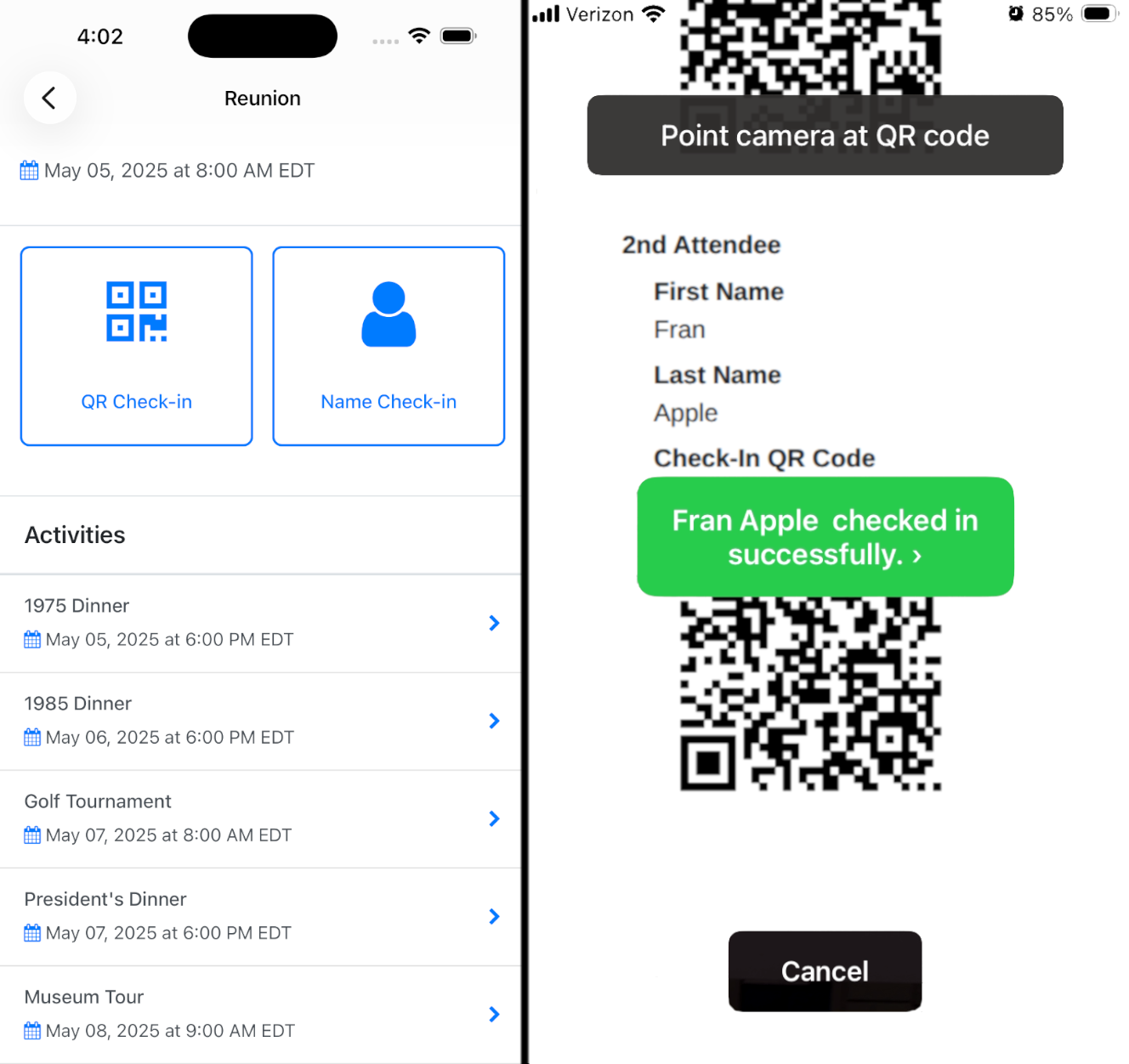
1. Search by Name
Quickly find attendees and check them in manually using the app. Ideal for flexibility when needed.
2. Scan QR Codes
Each registration or attendee can be assigned a QR code, allowing for rapid, contactless check-in with a simple scan.
This means:
• Lines move faster
• Staff workload drops dramatically
• Attendees glide into your event instead of waiting at the door
Each attendee can also use a single QR code across multiple events, making it ideal for reunions, homecomings, and complex event structures.
Smarter Attendance Tracking (Without the Spreadsheet Hangover)
Every check-in is instantly recorded in Advancement Form, giving you accurate, real-time attendance data.
No more:
• Reconciling paper lists after the event
• Guessing attendance numbers
• Manually updating systems
Multiple staff members can check in attendees simultaneously across different devices, ensuring lines keep moving even during peak arrival times.
And when the event is done?
Sync attendance directly with Blackbaud Raiser's Edge NXT to keep your data ecosystem clean, connected, and ready for your next event.
QR Codes: Built for Speed, Designed for Flexibility
You now have full control over how QR codes are generated for your events:
QR Code Per Registration
One code per booking
• Best for simpler events
• Staff can manually check in individuals within that registration
QR Code Per Attendee
One code per person
• Ideal for larger or more complex events
• Enables ultra-fast, individual check-in via scanning
QR codes are automatically included in:
• Their final confirmation page
• Thank-you emails
That way, your attendees arrive ready, and your team stays ahead.
Built for Real Event Environments
This isn’t just about faster check-in. It’s about making your event team more effective on the ground.
• Multiple staff members can check in attendees at the same time
• Attendees can use a single QR code across multiple events
• Designed for iOS devices (with Android on the way)
Because on event day, simplicity isn’t a luxury. It’s a requirement.
What This Really Means for Your Team
This isn’t just a feature. It’s a shift.
Instead of:
• Managing logistics
• Fixing errors
• Chasing data
Your team can:
• Focus on attendees
• Deliver a better experience
• Trust the data they’re collecting
What’s Coming Next
We’re just getting started.
Here’s what’s already on the roadmap:
• Real-time name tag printing
Check someone in → instantly print their badge
• Self-service kiosk mode
Attendees walk up, check themselves in, and print their own name tag
Think: faster entry, fewer staff requirements, and a more modern event experience.
The Bigger Picture
Advancement teams don’t run simple events.
You’re managing:
• Reunions with multiple sub-events
• Fundraising layers
• Complex attendee structures
• High expectations from stakeholders
Check-in shouldn’t be the bottleneck.
With Advancement Form’s mobile app, it isn’t.
Want to See It in Action? Click here to schedule a demo.